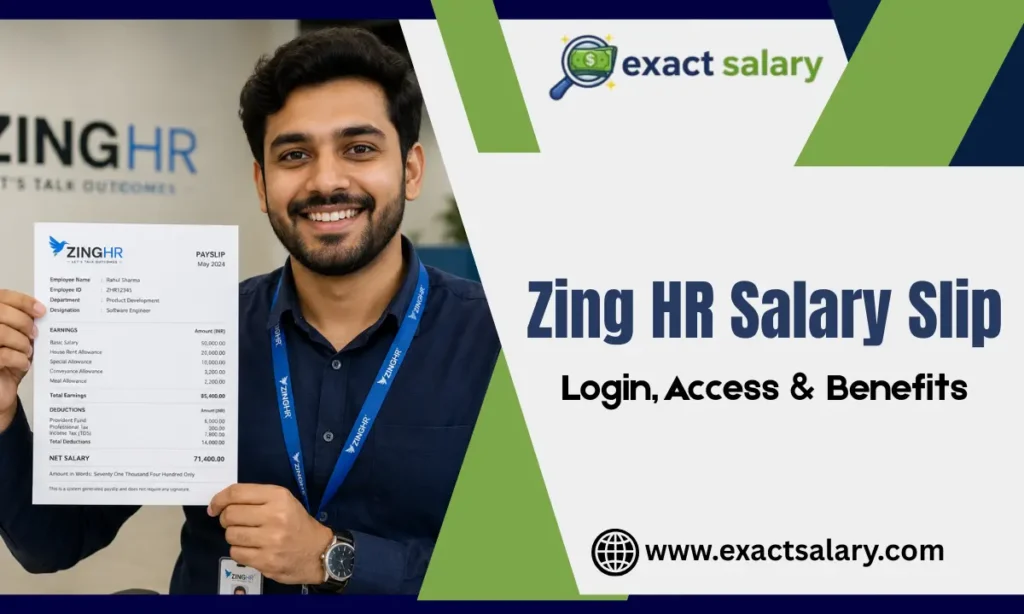
A salary slip is one of the most important employment documents for every working professional. Whether you need it for income proof, loan applications, tax filing, visa processing, or personal financial management, having easy access to your payslip is essential. Many organizations today use ZingHR, a cloud-based Human Resource Management System (HRMS), to manage employee records, attendance, payroll, and compensation details.
The Zing HR Salary Slip feature allows employees to view, download, and store their monthly payslips online without depending on the HR department. Through the Employee Self-Service (ESS) portal and mobile application, employees can access salary information anytime and from anywhere. ZingHR also provides cumulative payslips, compensation details, and payroll-related information in a secure environment.
What is ZingHR?
ZingHR is a modern Human Capital Management (HCM) platform used by businesses for employee lifecycle management, payroll processing, attendance tracking, recruitment, performance management, and workforce administration. The platform helps organizations streamline HR operations and improve employee experience through digital solutions.
Key Features of ZingHR
| Feature | Description |
|---|---|
| Payroll Management | Automated salary processing |
| Employee Self-Service | Employees can manage personal HR information |
| Attendance Tracking | Real-time attendance records |
| Leave Management | Apply and track leave requests |
| Compensation Management | View salary and payroll details |
| Mobile Access | Access HR services through mobile app |
| Performance Management | Goal setting and reviews |
| Recruitment Management | Hiring and onboarding tools |
What is a Zing HR Salary Slip?
A Zing HR Salary Slip is a digital payroll document generated after salary processing is completed. It contains detailed information regarding an employee’s earnings, deductions, taxes, allowances, and net salary received for a specific month.
The payslip serves as an official proof of employment and income and is often required for:
- Personal loan applications
- Home loan approvals
- Credit card applications
- Income tax filing
- Visa applications
- Rental agreements
- Employment verification
Components Included in Zing HR Salary Structure
Most organizations using Zing HR configure payroll with the following components:
| Salary Component | Purpose |
|---|---|
| Basic Pay | Core salary amount |
| HRA | Housing-related allowance |
| Special Allowance | Additional salary component |
| Conveyance | Transportation support |
| Medical Allowance | Healthcare-related benefits |
| Bonus | Performance incentives |
| Overtime | Additional work compensation |
| PF Deduction | Retirement contribution |
| ESI Deduction | Insurance contribution |
| Professional Tax | State tax deduction |
| TDS | Income tax deduction |
Information Available in Zing HR Salary Slip
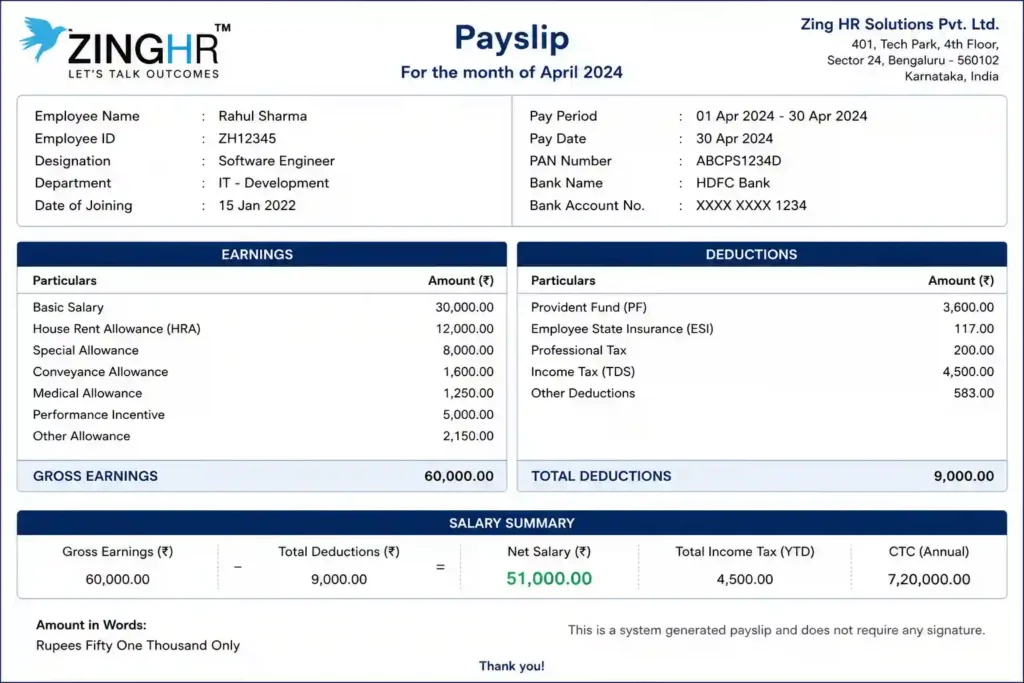
A typical Zing HR salary slip contains several important details about an employee’s monthly compensation.
Employee Details
- Employee Name
- Employee ID
- Department
- Designation
- Company Name
- Pay Period
Earnings Section
- Basic Salary
- House Rent Allowance (HRA)
- Special Allowance
- Conveyance Allowance
- Medical Allowance
- Performance Incentives
- Bonuses
Deduction Section
- Provident Fund (PF)
- Employee State Insurance (ESI)
- Professional Tax
- Income Tax (TDS)
- Other Company Deductions
Salary Summary
| Component | Purpose |
|---|---|
| Gross Salary | Total earnings before deductions |
| Total Deductions | Combined deductions |
| Net Salary | Final salary credited |
| Tax Details | Monthly tax deductions |
| CTC Details | Overall compensation structure |
How to Download Salary Slip from ZingHR Portal
Step 1: Login to ZingHR
Visit your organization’s ZingHR portal and log in using your credentials.
Step 2: Open Menu
After successful login, navigate to the dashboard menu.
Step 3: Go to My Compensation
Select the “My Compensation” option.
Step 4: Click Payslip
Open the Payslip section.
Step 5: Select Month
Choose the month for which you want to download the salary slip.
Step 6: Download PDF
Click the download button and save the payslip in PDF format.
How to Download Zing HR Salary Slip Through Mobile App
Employees can also access salary slips through the Zing HR mobile application.
Steps to Download Payslip on Mobile
- Open the ZingHR Mobile App.
- Login using your credentials.
- Navigate to the Payslip section.
- Select the desired month and year.
- View salary details.
- Download the monthly payslip.
- Save the PDF for future reference.
How to View Cumulative Payslip in ZingHR
Apart from monthly salary slips, ZingHR also allows employees to access cumulative payslips. A cumulative payslip provides salary information for the entire financial year rather than a single month.
Benefits of Cumulative Payslip
- Annual earnings overview
- Tax planning assistance
- Financial record maintenance
- Easy income verification
Benefits of Zing HR Salary Slip System
1. Instant Access
Employees can access salary records anytime without contacting HR personnel.
2. Paperless Process
Digital payslips reduce paperwork and support eco-friendly operations.
3. Secure Storage
Salary records are stored securely within the HRMS platform.
4. Mobile Accessibility
Users can access salary details directly from smartphones.
5. Faster Verification
Salary slips can be instantly downloaded for loan, visa, and tax purposes.
6. Better Financial Planning
Employees can track monthly income and deductions more effectively.
Common Reasons Why Salary Slip Is Not Visible
| Issue | Possible Reason |
|---|---|
| Payslip Not Available | Payroll not processed yet |
| Download Error | Browser issue |
| Login Failure | Incorrect credentials |
| Blank Payslip | System update in progress |
| Missing Month | Payslip not generated by payroll team |
In most cases, payslips become visible only after payroll processing has been completed by the organization.
How HR Teams Generate Salary Slips in ZingHR
HR Process
- Login as Administrator.
- Navigate to Payroll Management.
- Select Generate Payslip.
- Choose employees or departments.
- Select payroll month and year.
- Generate salary slips.
After generation, employees can access their payslips from their accounts.
Why Employees Need Salary Slips
Salary slips play a crucial role in both professional and personal financial activities.
Major Uses
- Applying for bank loans
- Credit card verification
- Filing income tax returns
- Employment verification
- Visa applications
- Financial planning
- Rental agreements
- Insurance claims
Maintaining monthly salary slips helps employees keep accurate financial records throughout their careers.
Security Features of ZingHR Payroll System
Security Highlights
- Password-protected access
- Employee-specific login credentials
- Secure payroll storage
- Controlled HR administration access
- Data protection measures
These features help ensure that confidential salary information remains protected from unauthorized access.
Tips for Managing Your Zing HR Salary Slips
Best Practices
- Download monthly payslips regularly.
- Store PDF copies securely.
- Verify salary components every month.
- Check tax deductions carefully.
- Report discrepancies immediately to HR.
- Maintain yearly salary records for future use.
Future of Digital Salary Management
The HR technology industry is rapidly moving toward fully digital payroll management systems. Modern HR platforms continue to expand payroll automation and employee self-service capabilities, making salary management easier and more efficient for organizations and employees alike.
Conclusion
The Zing HR Salary Slip system provides a convenient, secure, and efficient way for employees to access their monthly compensation records. Whether through the web portal or mobile application, employees can easily download salary slips, view cumulative earnings, and manage payroll-related information without relying on manual HR processes. With digital access, secure storage, and real-time availability, ZingHR has simplified payroll management for modern organizations and their workforce.
FAQs
How can I download my salary slip from Zing HR?
Login to ZingHR, go to My Compensation, select Payslip, choose the month, and download the PDF version.
Can I download salary slips from the ZingHR mobile app?
Yes, employees can view and download salary slips using the ZingHR mobile application.
Why is my salary slip not showing in ZingHR?
It may not have been generated yet by the HR or payroll team, or payroll processing may still be pending.
What is a cumulative payslip?
A cumulative payslip shows salary details for the entire financial year rather than a single month.
Can I access old salary slips in ZingHR?
Yes, previous salary slips are usually available within the payslip section depending on company policy.
Also, Read About: Cyber Security Salary in India: Average Pay, Freshers & Monthly Salary